
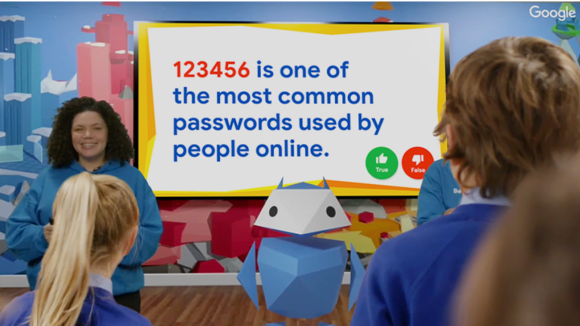
Be Internet Legends: Secure Live Lesson
Teacher Guide
Everything you need to know about delivering this live lesson on Tuesday 29 September 2026.
What is this lesson?
The Secure Live Lesson is a live-streamed broadcast for your class, delivered from Interland — Google and Parent Zone's digital world for the Be Internet Legends programme. It follows Pip, an Internaut who needs your class's help to stay safe from the Hacker.
Hosted by our presenter team, the lesson runs for under 30 minutes and combines short explainer segments with live, interactive challenges your class completes together in the classroom.
It's designed to be watched as a whole class, with you facilitating discussion and (optionally) feeding your pupils' answers back into the broadcast.
The broadcast includes three 'Class Time' activities — a 90-second pause where your class completes a short activity or discussion together. Each Class Time is followed by a Recap Time moment, where the presenters run through a selection of answers shared in the live chat before explaining the topic further.
What will pupils learn?
Objectives — children will learn:
- Why privacy and security matter, and what personal data is
- How to protect personal devices and accounts
- How to protect against scams, hackers and other threats
Outcomes — by the end, children can:
- Explain what personal data is and why it's important to keep it private online
- Describe ways to protect personal data through safety tools and privacy settings
- Describe how to find and ask for help if someone feels unsafe online
How it connects to the curriculum
This lesson is built directly from the Secure Activity Pack and Lesson Plan 9, so it complements (rather than replaces) classroom teaching:
Lesson section | Curriculum link |
Vocabulary warm-up | |
What is personal data, and why protect it? | |
Protecting personal devices and accounts | |
Seeking help | |
Plenary / assessment |
You can use the Secure Activity Pack before or after the broadcast to extend the learning.
What to expect
The lesson is presented in front of Interland's Tower of Treasure, and runs through three parts, each ending in a Class Time activity and Recap Time:
- Warm-up — a quick vocabulary guessing game (privacy, data, settings, password)
- Part 1: What is personal data? — introduces the many types of personal data, then Class Time: why is it important to protect it?, followed by Recap Time
- Part 2: Protecting devices and accounts — covers settings, 2FA, app permissions and biometric security, then Class Time: which tools help protect data and privacy?, followed by Recap Time
- Part 3: Seeking help — a scenario where Pip's password is hacked, then Class Time: what should you do if this happens to you?, followed by Recap Time
- Recap and close — a final confidence check and wrap-up
Throughout, pupils are asked to rate their confidence (1–10) at the start and end, so you can see the shift in understanding.
Your role
You're the bridge between the broadcast and your classroom. During each Class Time, the screen will go quiet (just music) for around 90 seconds — this is your cue to pause and lead a short class or group discussion on the question just posed. The following Recap Time is when presenters pick up the thread again, share a few live chat answers, and explain the topic in more depth.
The three Class Time questions are:
- Why is it important to protect personal data online?
- Which settings and tools can help you protect data and privacy online?
- What should you do if your password gets hacked?
You have two ways to take part:
- Live interaction: During Class Time, type a summary of your class's answer into the live chat. Presenters will read out a small selection of school responses during the following Recap Time, so there's a chance your class's thinking gets a shout-out during the broadcast.
- Offline discussion only: If you'd rather not use the chat, simply talk through the Class Time questions as a class or in groups — Recap Time still gives a full explanation of the topic, so pupils get the learning either way.
Either approach works — the chat is a nice-to-have for engagement, not a requirement for the lesson to land.
What you'll need set up beforehand
- A screen and audio for the whole class to watch the stream together
- Access to the live chat (if you plan to feed back answers) — have this open in a separate window or on a second device
- A quiet, engaged space for the short group-discussion pauses during each challenge
- Optional: the Secure Activity Pack on hand if you want to extend any of the three activities afterwards
Tips for the day
- The three Class Time pauses are timed (around 90 seconds each) — it helps to have pupils already in pairs/tables before the lesson starts, so no time is lost organising groups mid-broadcast
- Confidence ratings (1–10, at the start and end) are a nice light-touch way to gather quick assessment evidence without any extra prep.