
Be Internet Legends by Google, in partnership with Parent Zone, is an Ipsos-evaluated education programme for UK primary schools.
Following the training, children are twice as likely to show an improved understanding of internet safety than those who haven't.*
What is Be Internet Legends?
Be Internet Legends is designed to be easy for you to plan, deliver and track. It's a multi-faceted programme that teaches children the skills and behaviours they need to be safer and more confident online, built around five pillars – Sharp, Alert, Secure, Kind and Brave. There are several ways to use it, so you can choose what works best for you, your pupils and your school.
The programme has been updated for 2026 and beyond to reflect the digital world children are growing up in today. Alongside online safety, it now builds:
- AI literacy – what AI is and isn't, how to use it positively, and why a human should always stay in charge.
- Media literacy – checking sources, spotting fakes and disinformation, and searching effectively, including AI-generated content and search summaries.
- Privacy and data protection – keeping personal information and passwords private, including from AI tools.
- Social and emotional skills – kindness, empathy, a healthy balance with technology, and the confidence to ask a trusted adult for help.
Everything is free, ready to teach and designed to fit easily into PSHE, RSHE and computing lessons.
The five pillars at a glance
Each pillar has its own theme, activity pack and lesson plans for both age groups.
| Pillar | Theme | What pupils learn | Lessons (ages 7–9) | Lessons (ages 9–11) | Interland land |
|---|---|---|---|---|---|
| Be Internet Sharp | Think Before You Tap | Protecting their online reputation, what is OK to share, and what AI is and isn't | 1, 3, 7 | 8, 14 | Mindful Mountain |
| Be Internet Alert | Check it's For Real | Spotting scams, fakes and disinformation, and checking sources – including AI content | 1, 3 | 9 | Reality River |
| Be Internet Secure | Protect Your Stuff | Strong passwords, privacy settings and keeping information safe – including from AI tools | 2, 4 | 10 | Tower of Treasure |
| Be Internet Kind | Respect Each Other | Empathy, kindness and handling negative behaviour online | 2, 4 | 11 | Kind Kingdom |
| Be Internet Brave | When in Doubt, Discuss | Being an upstander, refusing and reporting upsetting content, and talking to a trusted adult | 5, 6 | 12, 13 | – |
What's new for 2026
Every pillar has been updated to help children navigate a world where AI is part of everyday life. The core online safety messages stay the same; the examples, scenarios and discussions now reflect the technology children actually use.
- Two new AI lessons. Lesson 7 (ages 7–9) and Lesson 14 (ages 9–11) explore what AI is and isn't, how it works, how it helps people, and how to find a healthy balance. Older pupils also design their own AI invention with a Human Takeover Button.
- AI in every pillar. New scenarios cover AI tools, cloned voices, fake videos, AI-generated images and AI chatbots, so pupils practise their skills in realistic situations.
- Stronger media literacy. Be Internet Alert now covers checking AI-generated content, AI search summaries, writing good prompts and why it's always worth checking the original source.
- Privacy and data. Pupils learn how apps, websites and AI tools collect information, and why passwords should never be typed into AI tools.
- Help-seeking. Be Internet Brave makes clear that AI chatbots are no substitute for a trusted adult, with guidance for educators on why chatbots are unsuitable for under-13s.
- Updated vocabulary. New terms include AI training, generative AI, predictive AI, AI bias, AI hallucination, AI Overview, prompt, and voice and video cloning.

The full set of resources
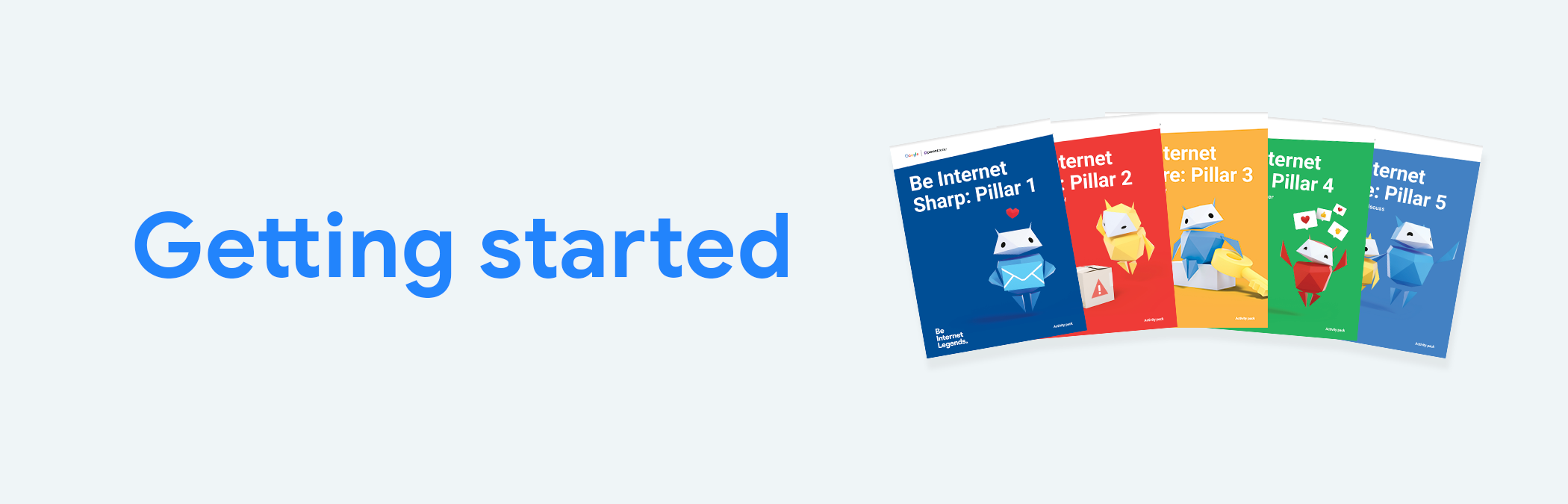
The curriculum has three core resources that work together: five activity packs, 14 lesson plans and 14 lesson presentations. All three have been updated for 2026. Before starting teaching, please read the teacher guide to pupil safety.
Five pillar activity packs
The activity packs are the heart of the programme. There is one pack per pillar, and each one contains everything you need to teach that pillar: a pillar overview, vocabulary sheets, step-by-step activities and all the worksheets and handouts. Each activity is a mini lesson that takes around 10–15 minutes to teach.
| Pack | Activities | Age range |
|---|---|---|
| Be Internet Sharp | 10 | 7–11 (with separate versions for 7–9 and 9–11 where needed) |
| Be Internet Alert | 7 | 7–11 |
| Be Internet Secure | 5 | 7–11 |
| Be Internet Kind | 8 | 7–11 (with separate versions for 7–9 and 9–11 where needed) |
| Be Internet Brave | 8 | 7–11 (with separate versions for 7–9 and 9–11 where needed) |
Some activities come in two versions – for example, Kind Activity 1.1 is for ages 7–9 and Activity 1.2 covers the same skill for ages 9–11. Each activity shows its age range so you can choose the right one.
14 lesson plans
The lesson plans turn the activities into ready-to-teach lessons of around 45–60 minutes. There are seven lessons for ages 7–9 and seven for ages 9–11. Each plan selects the most age-appropriate activities from one or two pillars, adds a baseline activity and plenary, and includes timings, differentiation and extension ideas.
14 lesson presentations
Each lesson plan is also available as a fully prepared Google Slides presentation. All the key teaching points and questions have been turned into interactive, engaging slides, with teacher notes to guide you. You can also share the slides in Google Classroom as a class assignment.
How the resources fit together
The activity packs hold the content; the lesson plans and presentations show you how to teach it. A typical lesson uses all three:
- Lesson plan – sets out the objectives, timings and which activities to use.
- Lesson presentation – the slides you teach from in class.
- Activity pack – the full activity notes, plus the worksheets and handouts pupils complete.
- Interland and live assemblies – optional extras that reinforce the learning (see below).
You can also use the activity packs on their own if you prefer to plan your own lessons.
Lesson map
| Lesson | Ages | Pillars | What pupils do |
|---|---|---|---|
| 1 | 7–9 | Sharp & Alert | Protect their online reputation, decide what's OK to share and spot phishing scams, including AI tricks like cloned voices |
| 2 | 7–9 | Secure & Kind | Create strong passwords, explore privacy settings, notice how others feel and plan a Kindness-gram |
| 3 | 7–9 | Sharp & Alert | See profiles through others' eyes, design emoji t-shirts and check whether sources – including AI content – are credible |
| 4 | 7–9 | Secure & Kind | Explore what happens when passwords are shared, who to tell if they feel unsafe or tricked, and how messages can be misread |
| 5 | 7–9 | Brave | Learn how to be an upstander and what to say when they see something upsetting, including fake AI videos |
| 6 | 7–9 | Brave | Learn when to get help, why AI chatbots are no substitute for a trusted adult, and how to report things online |
| 7 | 7–9 | Sharp (AI) | Learn what AI is and isn't, how it helps people, and agree a golden rule for a healthy balance |
| 8 | 9–11 | Sharp | Build a positive digital footprint and review privacy scenarios, including sharing information with an AI tool |
| 9 | 9–11 | Alert | Spot phishing scams and work out who someone really is online, including AI voice notes and videos |
| 10 | 9–11 | Secure | Create strong passwords, use privacy settings and two-step verification, and discuss who to go to for help |
| 11 | 9–11 | Kind | Practise empathy, find ways to show kindness – including over an AI-designed avatar – and read messages in different tones |
| 12 | 9–11 | Brave | Choose how to respond as an upstander and practise refusing or reporting upsetting content |
| 13 | 9–11 | Brave | Handle mean behaviour without escalating it, learn when to get help and how to report harmful content, including fake AI images |
| 14 | 9–11 | Sharp (AI) | Learn how AI works, tell generative and predictive AI apart, and design an AI invention with a Human Takeover Button |
Not every activity in the packs appears in a lesson plan. The remaining activities – such as Alert's search activities – are ready to use as extra lessons or follow-up work.
How the resources are structured
The activity packs and lesson plans follow the same layout throughout, so once you know one, you know them all.
Inside an activity pack
| Section | What it includes |
|---|---|
| Pillar overview | The pillar summary, objectives (what pupils will learn), outcomes (what pupils can do), the full activity list with age ranges, assessment opportunities and plenary, and which lesson plans use the pillar |
| Vocabulary | Definitions of the key words and phrases, grouped by activity |
| Activities | Each activity has a short introduction, an age badge, a 'You'll need' list, step-by-step instructions, a 'Let's talk' discussion and a summary |
| Teacher notes | Where relevant, media literacy background, safeguarding notes, notes for educators and modifications for younger pupils |
| Worksheets and handouts | Printable sheets for pupils, placed directly after the activity they belong to |
Activities are also tagged where they have a particular focus: ML for Media Literacy and SEL for Social and Emotional Literacy.
Inside a lesson plan
| Section | What it includes |
|---|---|
| Overall aims | What the lesson covers and which pillar or pillars it draws on |
| Objectives and outcomes | What pupils will learn, and what they will be able to do by the end |
| Reminder | A prompt to read the teacher guide to pupil safety or follow your safeguarding policy |
| Assessment opportunities | How to check understanding during the lesson |
| Timing | How long the lesson takes, with timings for each activity |
| Baseline activity | A short starter to find out what pupils already know |
| Activity guide | The activities to teach, with differentiation ideas for pupils needing support or a challenge, and sometimes an additional activity |
| Plenary | A closing activity for pupils to reflect on what they've learned |
| Extension | Ideas to take the learning further, often something to share with families or the wider school |
| Lesson materials | The worksheets and handouts you need from the activity pack |
Where to find worksheets
All worksheets and handouts are in the pillar activity packs, directly after the activity they belong to. The 'Lesson materials' list at the end of each lesson plan tells you exactly which ones to print. For example, Lesson 7 uses the Activity 7 and Activity 8a handouts from the Be Internet Sharp pack.
Interland: learning through play
Interland is Google's free online game that brings the Be Internet Legends pillars to life. Pupils explore four lands, each linked to a pillar, and put their skills into practice as they play.
| Land | Pillar | What pupils practise |
|---|---|---|
| Mindful Mountain | Be Internet Sharp | Thinking carefully about what they share and with whom |
| Reality River | Be Internet Alert | Telling what's real from what's fake |
| Tower of Treasure | Be Internet Secure | Building strong passwords and protecting private information |
| Kind Kingdom | Be Internet Kind | Responding to unkind behaviour and spreading kindness |
Each Interland activity in the packs comes with discussion questions for after the game, with a separate set for younger pupils. In the lesson plans, Interland is often included as an additional activity, so you can use it if time allows. It runs in a web browser on a computer or tablet, with no download or login needed.
Live events and assemblies
Be Internet Legends assemblies bring the programme into your school as a shared, whole-school moment. Delivered by Parent Zone, they introduce the five pillars in an interactive, engaging way and give pupils a common language for talking about life online.
Assemblies work well at any point in your teaching:
- Before you start – to launch the programme and get pupils excited about becoming Internet Legends.
- Alongside the lessons – to reinforce key messages and connect learning across year groups.
- After the lessons – to celebrate what pupils have learned and refresh the messages.
Find out more and book on the Be Internet Legends assemblies page.
The pillars in depth
Be Internet Sharp: Think Before You Tap
Pupils learn to protect their online reputation and understand that what they share can be seen by anyone, far into the future. They decide which personal information is OK to share, explore digital footprints, and see their online profiles through other people's eyes.
This pillar is also home to the programme's AI learning. Pupils find out what AI is and isn't, how it works, how it helps people and the planet, and why it's important not to rely on it too much. Two activities have a Media Literacy focus, exploring how media is interpreted and how visual media – including AI-generated images – is framed by the choices and prompts behind it.
- Activities: 10
- Lessons: 1, 3 and 7 (ages 7–9); 8 and 14 (ages 9–11)
- Interland: Mindful Mountain
Be Internet Alert: Check it's For Real
Pupils learn that not everything they see online is true, and that AI can make it harder to tell fact from fiction. They spot phishing scams, work out who someone really is online, and judge whether a source is credible.
The updated pack shows how scammers can use AI to clone voices or create fake videos. Four activities have a Media Literacy focus, covering evaluating sources, identifying disinformation and searching effectively – including how AI summaries appear in search results and why it's always worth checking the original source.
- Activities: 7
- Lessons: 1 and 3 (ages 7–9); 9 (ages 9–11)
- Interland: Reality River
Be Internet Secure: Protect Your Stuff
Pupils learn why privacy and security matter and how they work together. They create strong passwords, explore privacy settings and two-step verification, and discuss who to go to if they feel unsafe online.
The updated pack explains how apps, websites and AI tools can collect information, and why passwords should never be shared – including with AI tools. Pupils also explore how AI tools, fake videos or cloned voices can be used to trick people.
- Activities: 5
- Lessons: 2 and 4 (ages 7–9); 10 (ages 9–11)
- Interland: Tower of Treasure
Be Internet Kind: Respect Each Other
Pupils learn to show kindness and empathy online, and how to recognise and manage negative behaviour like mean comments or misunderstood messages. They practise noticing how others feel, plan ways to show kindness and turn negative comments into positive ones.
The updated pack explores kindness and respect in an AI-connected world – for example, responding when a friend's AI-designed gaming avatar gets unkind comments. Activities with a Media Literacy or Social and Emotional Literacy focus build critical thinking and empathy.
- Activities: 8
- Lessons: 2 and 4 (ages 7–9); 11 (ages 9–11)
- Interland: Kind Kingdom
Be Internet Brave: When in Doubt, Discuss
Pupils learn that being brave online means speaking up and asking for help. They explore the roles in a bullying incident and how to be an upstander, practise refusing upsetting content, and find out how to block and report things online.
The updated pack covers what to do about AI-generated content that is upsetting, fake or inappropriate. It also makes clear that AI chatbots are no substitute for a trusted adult, with notes for educators on why chatbots are unsuitable for under-13s.
- Activities: 8
- Lessons: 5 and 6 (ages 7–9); 12 and 13 (ages 9–11)
Getting started
- Read the teacher guide to pupil safety and check your school's safeguarding policy before you teach any activity.
- Pick your age group. Lessons 1–7 are for ages 7–9; Lessons 8–14 are for ages 9–11.
- Choose a lesson from the lesson map, or start with Lesson 1 or Lesson 8 to introduce the programme.
- Download the lesson plan, presentation and activity pack for the pillar or pillars that lesson uses.
- Print the worksheets listed under 'Lesson materials' in the lesson plan.
- Add Interland or an assembly to bring the learning to life and reinforce the messages across your school.
If you have any questions, email legends@parentzone.org.uk.
*Data based on research commissioned by Google and run by Ipsos MORI from April to July 2021 among 1,638 primary school pupils in Years 3–6 across 16 schools in the UK where Google carried out Be Internet Legends online safety training.
* Data based on research commissioned by Google and run by Ipsos Mori from April to July 2021 among 1,638 primary school pupils in years 3-6 across 16 schools in the UK where Google carried out Be Internet Legends online safety training.